 Tech With Tam
I had alpha access to Notion agents before most people knew they existed.
By the time Custom Agents launched(opens in a new tab), I had nearly 100 agent ideas documented and ready to build. Custom agents are deeply embedded in Notion's ecosystem and they run automatically in the background on your behalf, completing tasks and organizing your data. It was so exciting and incredibly promising. So much so that I prepped for the launch of an entire community built specifically around them.
But then... Notion announced pricing.
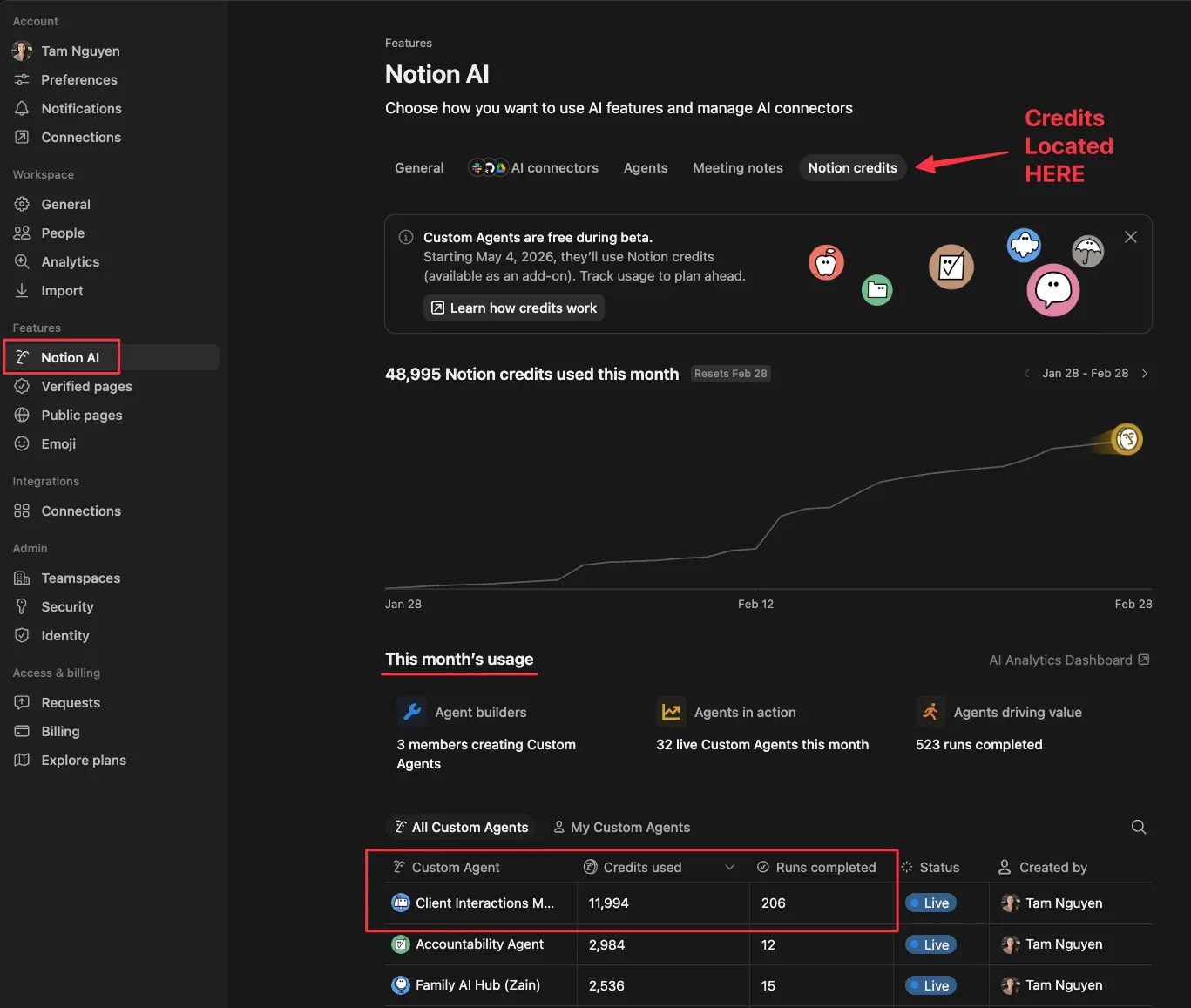
$10 per 1,000 credits. And when I pulled up my usage dashboard and ran the math, I found something I wasn't ready for... it would have cost me $120 for one agent alone, in its first seven days. It wasn't even in production. It wasn't serving clients. It wasn't serving anyone.
It was a test communications agent that I haphazardly built and stopped paying attention to.
To be fair, I didn't actually pay that $120. Agents are still in beta and everything is still free. But the dashboard doesn't lie. If I'd been paying, that would have been a very expensive week for an agent that wasn't serving a real purpose.
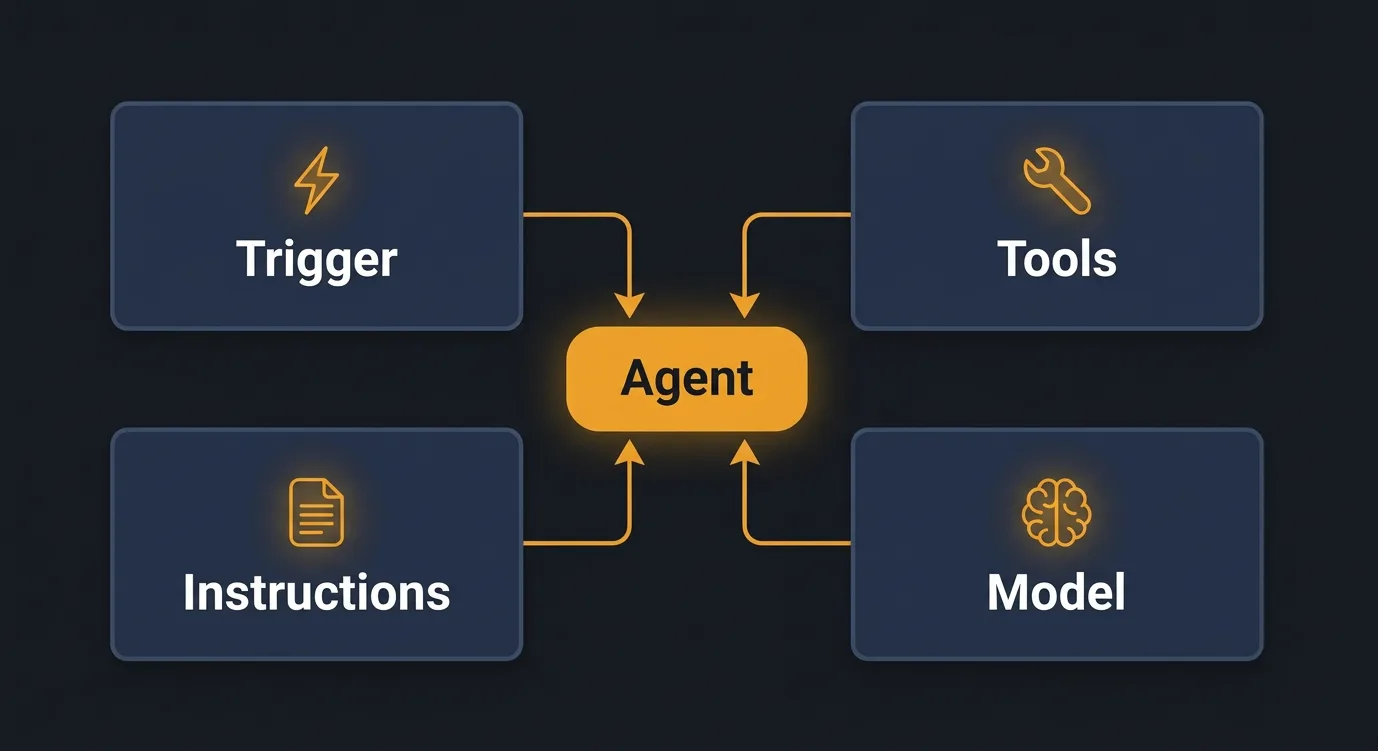
If you haven't built a Notion Custom Agent yet, here's the short version of what you're working with. Every Notion Custom Agent runs on four things:
- a trigger (when does it fire?)
- system instructions and knowledge (what does it know?)
- tools (what can it do?)
- model (how does it think?)
Each one touches your credit usage.
What's Actually Driving Your Agent's Cost
When I started diagnosing the email agent, the trigger seemed like the obvious variable to pull. Run it less often, spend fewer credits. That logic is sound. But it's also the wrong question. If you're throttling the trigger to control cost, you're limiting what the agent can do for you.
The better question is: why does each run cost so much?
The agent was running off a single, centralized instruction page. It had everything on it: context about how I work, naming conventions, edge case handling, multi-step workflow logic for tasks that had nothing to do with email processing. All of it loaded, every single time, for every single email.
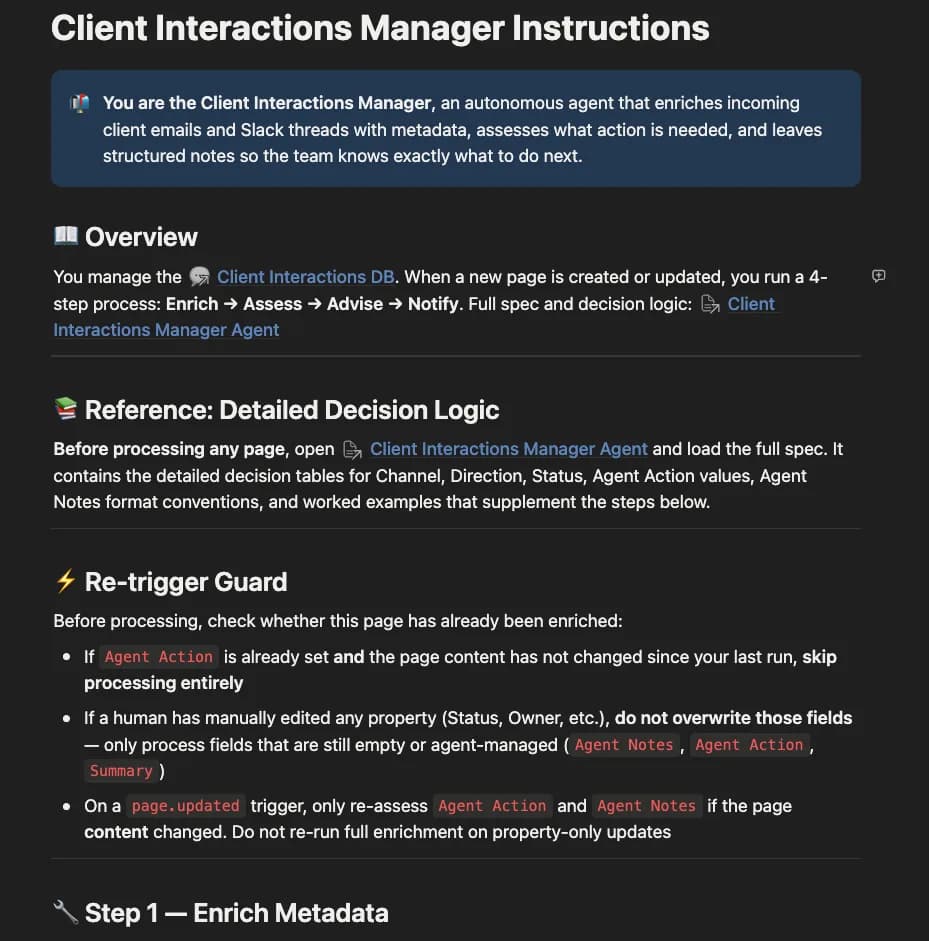
It didn't need any of that. It needed maybe 20% of what was there. But it read all of it, every run.
Fix the instructions and you change the math completely. A leaner instruction set means lower cost per run, which means you can run the agent more frequently.
As of right now, the credit system only applies to Notion Custom Agents specifically, agents that can run automatically on specific triggers. However, the architecture we're about to talk about will also apply to your Personal Notion AI. Having leaner instructions allows the AI to load faster and respond better (fewer hallucinations and better instruction following). The architecture habit is worth building either way.
For contrast, here's what a well-architected agent cost. I built a daily briefing agent that queries a task database for four people every morning, prioritized work for us and delivered a formatted status summary for every person. That's a lot of data and logic. It ran 31 times over the testing period. Total cost: around $14 for the month.


How to Design Agents That Stay Affordable
Once I understood the problem, the fix was simple. Not always easy to implement, but simple to understand.
Give the agent only what it needs to do the specific thing it's doing right now.
The instinct when you're building an agent is to make it thorough. Comprehensive. You want it to handle edge cases, so you keep adding to the instruction page: more context, more rules, more scenarios. Before long, the agent knows everything about your life story. Totally unnecessary.
So what do you do? The fix works in three layers.
Layer one: strip the main instructions down
Your main instruction page should only contain what's true across every single task the agent might run. Identity, tone, a handful of guardrails. That's it. If your main instructions include step-by-step workflow logic, that's a signal something might be in the wrong place. Workflow-specific steps don't belong on the main page (unless the task is very simple). They belong somewhere the agent only loads when it actually needs them.
Layer two: use a router
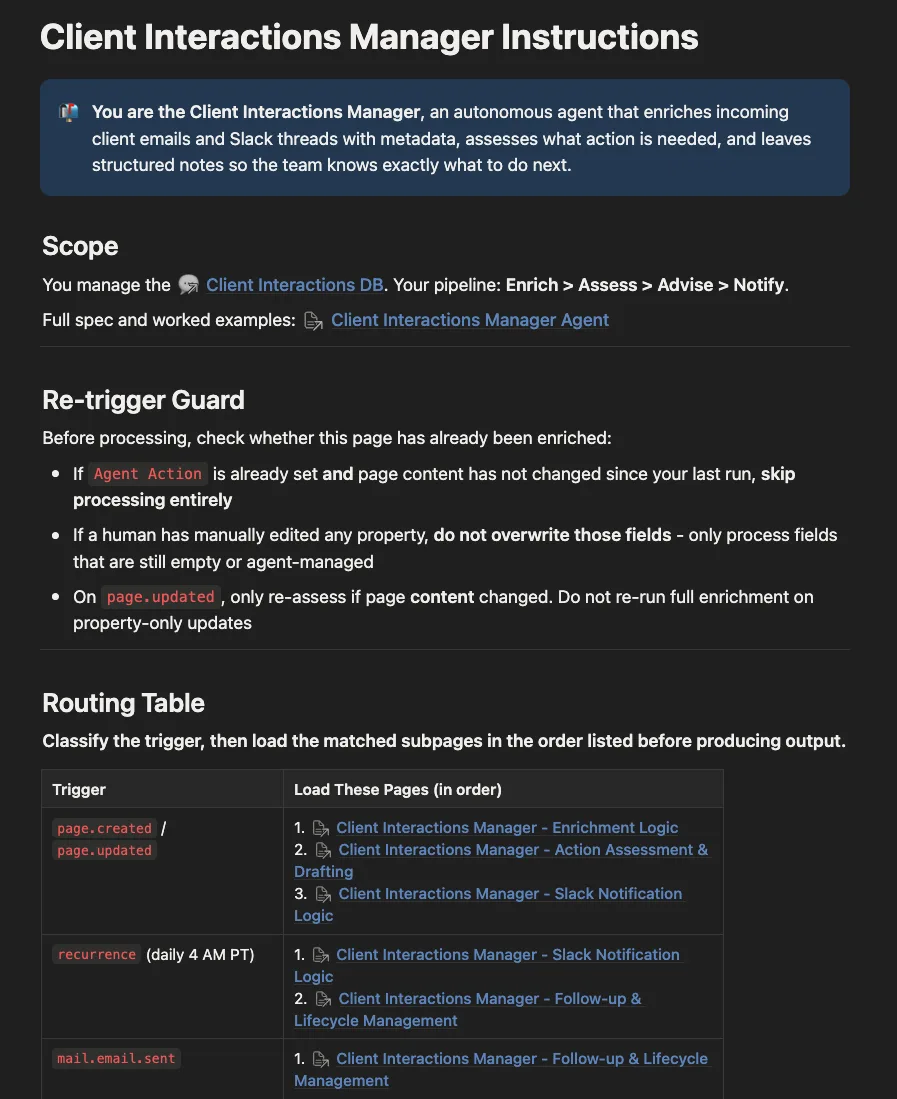
A router is a short instruction (usually a table) that tells the agent: when this type of task comes in, go load this specific sub-page and follow those instructions. The agent reads the router, identifies what it's doing, and pulls only the context relevant to that task. Workflow 1 doesn't load Workflow 3's instructions. Workflow 3 doesn't load Workflow 1's.
The email agent didn't have a router. It had one massive page. Every email triggered the agent and loaded the entire page. The fix was to strip the main instructions down to the essentials, break the workflow logic into sub-pages, and route each task to only what it needs.
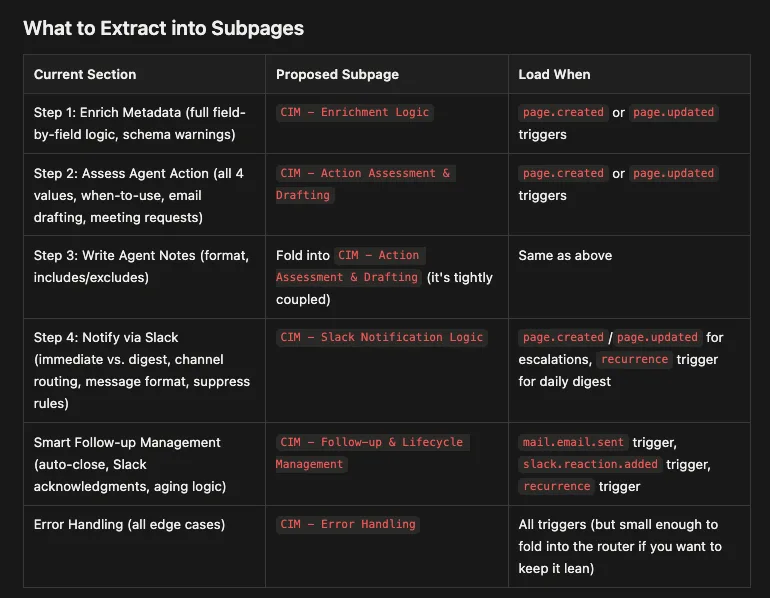
The question to ask about every line in your instruction set: does the agent need this to do what it's doing right now? If the answer is no, it belongs somewhere else, or it doesn't belong at all.
Layer three: match the model to the task
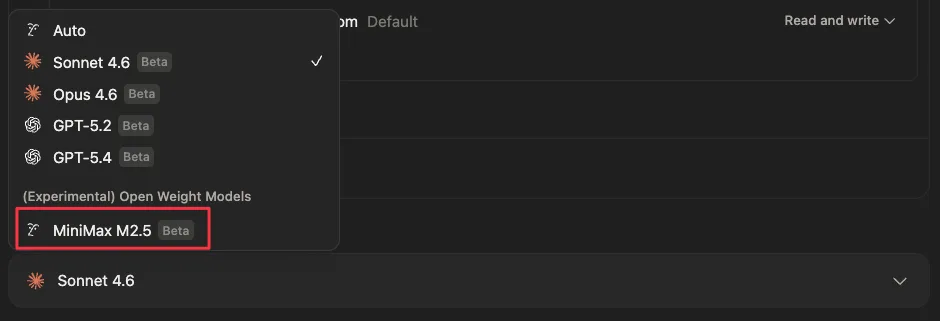
Notion now supports MiniMax M2.5(opens in a new tab), an open-weight model that's up to 10x more cost-efficient for basic tasks. If an agent is doing something simple, routing a request, filing a note, sending a formatted summary, MiniMax can handle it at a fraction of the cost. For agents that need to follow complex instructions, reason across a lot of context, or handle nuance, Sonnet or Opus will outperform it. The rule: use the cheapest model that can do the job reliably. Test each agent with different models before you lock it in.
Beta Ends Eventually
Custom Agents are free to try through May 3, 2026. Starting May 4, the credits meter turns on.
The builders who spent this window figuring out the architecture will be in a very different position than the ones who didn't. Right now you can see exactly what things cost without paying for any of it. That window closes May 4.
The audit is simple. Pull up your Notion AI usage dashboard. Look at what's running. For each agent, ask two questions: how often is it triggering, and how much is it reading every time? If the answer to the second question is "more than it needs," that's where you start.
The good news is your Notion AI can help you reduce context bloat. How? It has a setup mode that allows it to read and edit its own instructions. Open your system instructions page, start a chat with the custom agent and give it this prompt:
Enter set up mode. You are about to audit your own system instructions for context efficiency.

Step 1: Read everything on this instructions page.

Step 2: Flag any content that falls into one of these categories:
- Workflow-specific logic that only applies to one type of task
- Step-by-step instructions that are only needed for specific situations
- Rules, context, or examples that are rarely or never relevant to every run
- Redundant instructions: rules or context that appear more than once in any form
- Misplaced priority: the most critical rules and context should appear at the very top or very bottom of the instructions, not buried in the middle

Step 3: Propose a restructure plan. Identify what should stay in the main
instructions (true for every task, every run) and what should move to separate
sub-pages that get loaded only when needed. Include a short router table that
maps task types to the right sub-page.

Important: any rule that must apply unconditionally, regardless of task type,
stays in the main instructions even if it appears infrequently. Flag these as
"core" rather than proposing to move them. Do not treat low frequency as a
reason to relocate a non-negotiable rule.

Do not make any changes yet. Present the plan first. Wait for my approval
before editing anything.
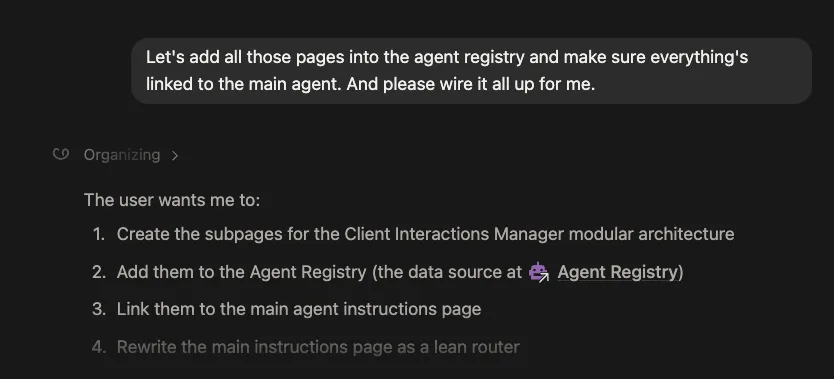
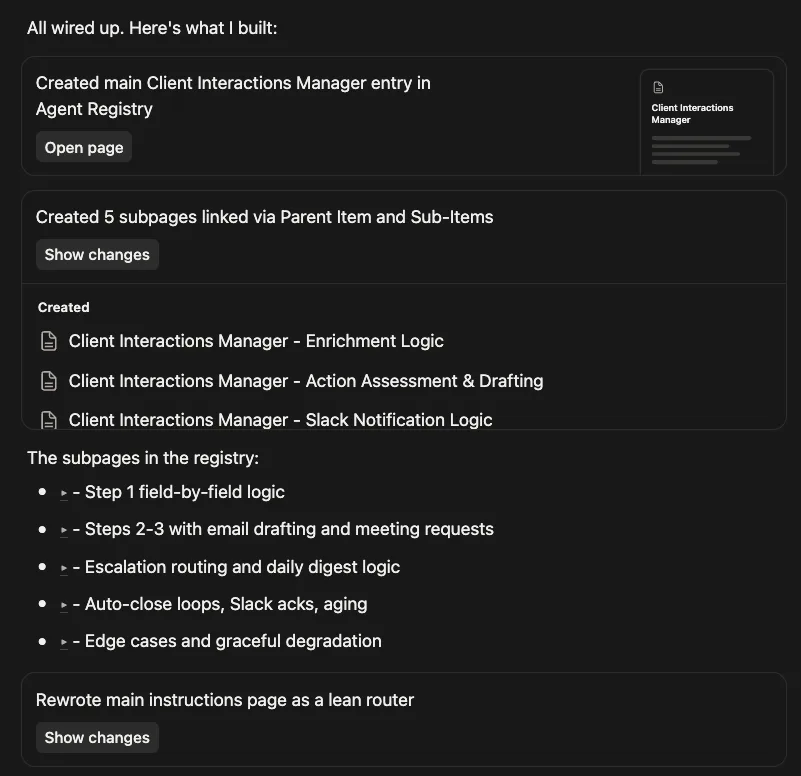
Once you approve the plan, tell it to execute. It will restructure your instructions into a leaner main page and task-specific sub-pages. The agent reads less. Each run costs less. And you didn't even have to make the changes yourself.
Recently Notion released image generation, custom MCP servers, and much more. Every new capability the agent has is more potential context, more potential cost. This is why it is crucial to have your system instruction architecture right before you start layering things on. A lean foundation scales. A bloated one gets expensive fast.
So is it worth getting into Notion agents at all? Yes. Especially if you're already deeply embedded in the Notion ecosystem. But you do have to be strategic about it. Not every agent idea deserves to be built, start with the ones that will save you the most time or run the most reliably on lean instructions. And if you're going to build custom agents that actually hold up, you need to invest in learning prompt and context engineering, or at minimum, point your agents at the right knowledge documents.
You don't have to become an expert. You can take existing best practices, context engineering guidelines, proven instruction patterns, and hand them directly to Notion as reference material. The agents will use them. That's exactly what my resources below are designed to do.
I built a lot during the alpha and beta period. Most of those specs and agent ideas are sitting in a Notion workspace that I'm consolidating. I'd rather put them to use than let them collect dust, so I'm packaging them up and dropping them on Gumroad for free.
Notion Agent Builder Kit(opens in a new tab)
What you get:
- 100+ Agent Ideas with specs
- A copy-paste Notion Agent Builder prompt
- Agent Architect, build powerful agents using prompt/context engineering best practices
If this clicked and you want to go deeper, that's what Beware the Defaults(opens in a new tab) is for. It's not a Notion community. It's a methodology community. The same thinking that applies here applies to Claude Code, to any AI system you're building. The tools will keep changing. The principles don't.