 Tech With Tam
Reading about delegation does nothing. The thing that flips a switch in your head is watching a real chore of yours get done while you sit there. So let us do that now. Ten minutes, one small task, start to finish.
Pick something annoying with low stakes. The first delegation is about feeling the handoff work.
Start from a blank task
Select New task in the Codex sidebar. You should land on a blank screen asking, “What should we work on?” This is your starting line. Choose the folder for the task, then the composer appears below for your instructions.
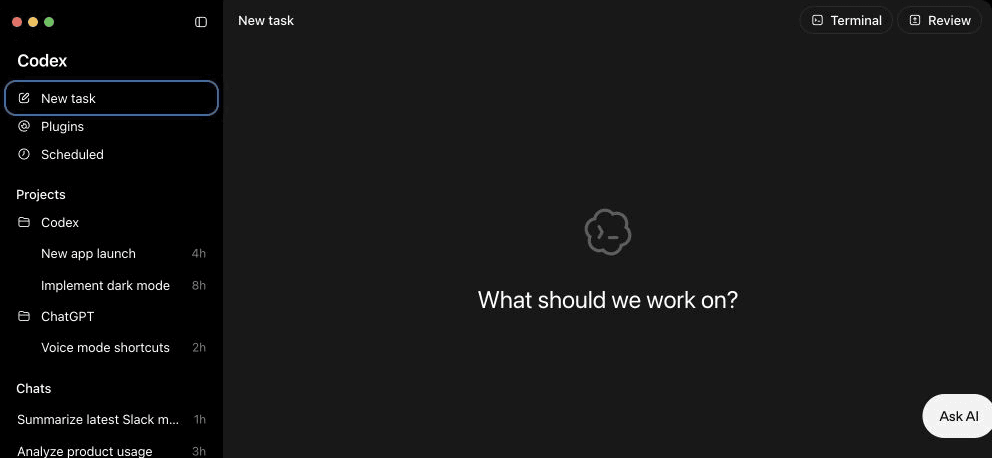
This official OpenAI product view is the screen you are aiming for before you hand over the first chore.
Pick one real chore
You need a folder on your computer with a file or two in it, because that is how Codex works. You point it at a folder so the task has a clear working boundary. Everything below is just a chore that lives in a folder.
Pick one of these. All three work on any plan, because all three are just Codex reading and writing files in a folder you chose.
- Clean up a messy text file. You have one. Notes with broken formatting, a pasted list that lost its structure, a document with inconsistent headings. Drop it in a folder by itself and hand that folder to Codex.
- Summarize a folder of notes. Gather a handful of related notes or documents into one folder. Ask Codex to read them all and write you a one-page summary as a new file.
- Draft a comparison table. Put a couple of documents describing options, tools, or plans into a folder. Ask Codex to read them and produce a table comparing them, saved as a new file.
I would start with the first one. It is the fastest to feel, because you can see the before and after in the same file.
The exact prompt
Follow this in order:
- Make a folder and put your one messy file inside it.
- Open the ChatGPT desktop app(opens in a new tab), select New task, and open the folder you just made.
- Pick the folder you just made. Confirm the mode is Codex.
- Open the permission control(opens in a new tab) beneath the composer. Choose Ask for approval.
- Replace the two bracketed parts in the prompt below with your real file name and your real mess. Paste it into the composer and send it.
Read the file [your-file-name] in this folder. It is a mess:
[say what is wrong, in one plain sentence, for example
"the headings are inconsistent and there are random blank lines"].

Clean it up so it is easy to read. Fix the formatting, keep all
the actual content, and do not add anything I did not write.

Show me what you changed before you finalize it.
That last line is an instruction in your brief: you are explicitly asking Codex to show the proposed change before it writes. The product's approval layer is separate and may also interrupt sensitive local operations. Apps, the browser, and Computer Use each use their own controls.
Keep Ask for approval selected as a safeguard for actions beyond the folder. You already set the leash. This is the walk.
When Codex shows the proposed change, compare it with your original file before you reply. Check that every word and number is still there, and that only the formatting changed. Then approve the save or name the exact gap you want fixed.
Watch it work
Here is what you are about to see, so it does not feel like a black box.
Codex will say what it is doing, in plain language. Reading the file. Noticing the problems. Your brief asks it to show the proposed change and wait for your response before writing. When it follows that instruction, you review the proposal, reply, and then check the cleaned-up file in your folder. Keep the approval layer on as a separate safeguard for sensitive local operations.
The waiting will feel strange the first time, the same way it felt strange for me. You are used to the app replying instantly. Here it is working through the task. Let it.
This is delegation
That difference has a name, and it runs through the rest of the course.
Treat it as delegation.
A conversation can stay in the back and forth. Delegation aims at a completed task. You hand off enough of a brief for the work to come back ready for review. Measure the delegation by the file on your disk and whether it meets the brief.
Every time you catch yourself sanding a reply back and forth, ask what task you are actually trying to get done and hand it over clearly.
You now have an artifact
Look at your folder. The cleaned-up file is sitting where it lives, ready for your review.
That is an artifact: a real piece of work that exists after the task ends. This is the point of the whole thing. You got your file back, better, while you watched.
Sit with that for a second. That small, slightly uncanny feeling is exactly what this course is teaching you to reach on purpose, for tasks that matter a lot more than one messy file.
What comes next
You just delegated a one-off chore. The next step is to give Codex a starting guide to the writing patterns you use.
In Module 2 we build your Voice DNA file. It is a single file that records observed patterns from your own examples, then saves them in your folder for reuse. A compatible tool can use the guide as a starting point, and you still review every draft with your own judgment.
That file gives the next draft more useful context about your choices. We build it together, step by step, next.